%%{init: {"flowchart": {"curve": "basis"}, "theme": "base", "themeVariables": {"lineColor": "#64748b", "fontFamily": "Arial"}}}%%
flowchart LR
    Book["books/dracula.txt"]:::data --> Counts["counts/dracula.tsv"]:::output --> Figure["figures/dracula.html"]:::output
    CountScript("scripts/count_words.py"):::script -. creates .-> Counts
    PlotScript("scripts/plot_counts.py"):::script -. creates .-> Figure
    classDef data fill:#dbeafe,stroke:#2563eb,color:#000
    classDef output fill:#dcfce7,stroke:#16a34a,color:#000
    classDef script fill:#fef3c7,stroke:#b45309,color:#000
Automation
This tutorial was adapted from the Automation and Make lesson by The Software Carpentries and reworked for
gecs-make.
Prefer a presentation first? View the Automation slides.
Automation turns a one-off analysis into a workflow you can repeat. In this project, we start with books in books/, count their words in counts/, and create interactive plots in figures/.
We will first automate Dracula one file at a time. Only after that will we teach Make how to repeat the same workflow for every book.
Set up the project
Clone the example project and install its locked dependencies:
git clone https://github.com/igorsdub/gecs-make.git
cd gecs-make
uv sync
Check that GNU Make is available:
make --versionOn macOS, install GNU Make with brew install make if needed; Homebrew may call it gmake. On Ubuntu or WSL, use sudo apt install make.
A first command target
Make can name an action as well as build a file. Add this to a new Makefile in the project root:
.PHONY: requirements
requirements:
    uv sync
Now this familiar setup command also has a Make entry point:
make requirements
NoteWhat does
.PHONY mean?
requirements is an action, not a file we want to create. .PHONY tells Make to run the recipe even if a file named requirements happens to exist.
First: make a count table
Add this rule below requirements:
counts/dracula.tsv: books/dracula.txt scripts/count_words.py
    uv run python scripts/count_words.py books/dracula.txt counts/dracula.tsv
Run it with:
make counts/dracula.tsvThere are three parts to a rule:
- Target —
counts/dracula.tsv, the file we want Make to create. - Prerequisites —
books/dracula.txtandscripts/count_words.py, the input book and the code that reads it. - Recipe — the indented
uv run python ...command that creates the target.
Before running the recipe, Make checks whether the target exists and whether either prerequisite is newer. If the target is missing or out of date, Make runs the recipe. Run the command a second time to see Make skip work that is already current.
TipCode is an input too
The counting script is listed as a prerequisite on purpose. If you change the code, Make rebuilds the count table even when the book itself has not changed.
WarningRecipe lines begin with a TAB
Each recipe line in a Makefile must begin with a literal TAB character, not spaces. Otherwise Make usually reports missing separator.
In VS Code, select the recipe lines and use Command Palette → Convert Indentation to Tabs. The example project includes an .editorconfig file that helps compatible editors keep this setting.
Next: turn counts into a plot
Add a second rule:
figures/dracula.html: counts/dracula.tsv scripts/plot_counts.py
    uv run python scripts/plot_counts.py counts/dracula.tsv figures/dracula.html
Now ask for the final output:
make figures/dracula.htmlMake notices that the HTML plot needs the count table. It builds counts/dracula.tsv first if necessary, then runs the plotting recipe. The resulting dependency chain is a directed acyclic graph (DAG): each arrow has a direction, and the workflow cannot loop back on itself.
%%{init: {"flowchart": {"curve": "basis"}, "theme": "base", "themeVariables": {"lineColor": "#64748b", "fontFamily": "Arial"}}}%%
flowchart LR
    Book["books/dracula.txt"]:::data --> Counts["counts/dracula.tsv"]:::output --> Figure["figures/dracula.html"]:::output
    CountScript("scripts/count_words.py"):::script -. prerequisite .-> Counts
    PlotScript("scripts/plot_counts.py"):::script -. prerequisite .-> Figure
    classDef data fill:#dbeafe,stroke:#2563eb,color:#000
    classDef output fill:#dcfce7,stroke:#16a34a,color:#000
    classDef script fill:#fef3c7,stroke:#b45309,color:#000
From one book to every book
The two Dracula rules work, but copying them for every title would be tedious. We will generalize the same plan in small pieces.
Give repeated commands names
At the top of the Makefile, add variables for the parts we repeat:
PYTHON := uv run python
COUNT_SCRIPT := scripts/count_words.py
PLOT_SCRIPT := scripts/plot_counts.py
Then the Dracula recipe can use those names:
$(PYTHON) $(COUNT_SCRIPT) books/dracula.txt counts/dracula.tsvVariables keep shared information in one place. If the command or script path changes, update it once.
Find the books that really exist
wildcard searches the directory when Make reads the file. Add:
BOOK_FILES := $(wildcard books/*.txt)

.PHONY: print-books
print-books:
    @printf "%s\n" $(BOOK_FILES)
Try it:
make print-booksThe leading @ hides the printf command itself, leaving only the filenames in the output.
Derive the output filenames
patsubst transforms every matching book path into another path. Add these variables and the two small inspection targets:
COUNT_FILES := $(patsubst books/%.txt,counts/%.tsv,$(BOOK_FILES))
FIGURE_FILES := $(patsubst books/%.txt,figures/%.html,$(BOOK_FILES))

.PHONY: print-counts print-figures
print-counts:
    @printf "%s\n" $(COUNT_FILES)

print-figures:
    @printf "%s\n" $(FIGURE_FILES)
For example, patsubst changes books/moby_dick.txt into counts/moby_dick.tsv. Use make print-counts and make print-figures to inspect the lists before building anything.
Replace the Dracula rules with pattern rules
The % means “the same filename stem.” These two rules work for Dracula, Frankenstein, and any other matching book automatically:
counts/%.tsv: books/%.txt $(COUNT_SCRIPT)
    @mkdir -p $(@D)
    $(PYTHON) $(COUNT_SCRIPT) $< $@

figures/%.html: counts/%.tsv $(PLOT_SCRIPT)
    @mkdir -p $(@D)
    $(PYTHON) $(PLOT_SCRIPT) $< $@
$< is the first prerequisite and $@ is the target currently being built. In the first rule, that means “read this book and write this count table.” mkdir -p $(@D) makes sure the output directory exists before the script writes its file.
Finally, add an all target that depends on every HTML plot:
.PHONY: all
all: $(FIGURE_FILES)
Now Make can build the complete project:
make allAdd another .txt file to books/ and rerun make all. The file lists and pattern rules pick it up without any new handwritten analysis rule.
NoteOptional commands and the project graph
The full project Makefile also provides a few convenience targets:
.PHONY: clean help

clean:
    rm -f $(COUNT_FILES) $(FIGURE_FILES) $(FIGURE_FILES:.html=.png) figures/workflow.svg

help:
    @printf "Available targets:\n"
    @printf "  make requirements           Install locked dependencies with uv sync\n"
    @printf "  make print-books            List input book files\n"
    @printf "  make all                    Build HTML plots for all books\n"
    @printf "  make clean                  Remove generated files\n"
Use make clean to remove generated count tables, plots, companion PNGs, and the workflow graphic. make help prints the main entry points.
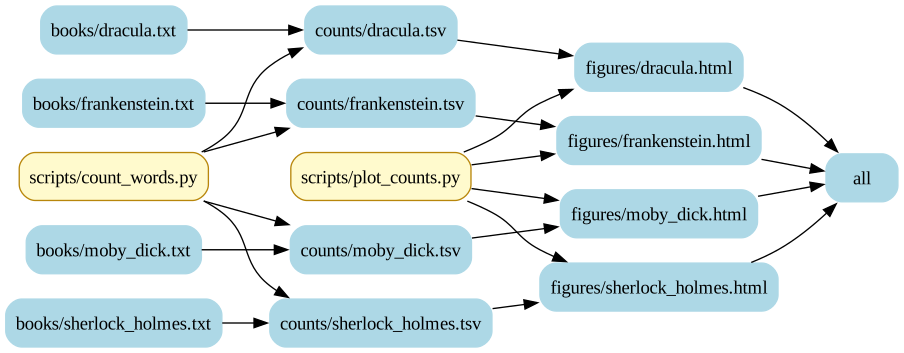
The optional make dag target uses makefile-graph and Graphviz to render a compact projection of the real project. It shows four representative books so the graph stays readable. Install the graph tool first if necessary:
go install github.com/dnaeon/makefile-graph/cmd/makefile-graph@latest
make dag
In the generated graph, blue rounded boxes are files and gold boxes are Python scripts. The arrows show the data flow from source book through count table to HTML figure.
Takeaway
Make is most useful when your work produces files from other files. First name one output and its inputs. Then use variables, file lists, and pattern rules to apply that same plan to a whole directory of inputs.